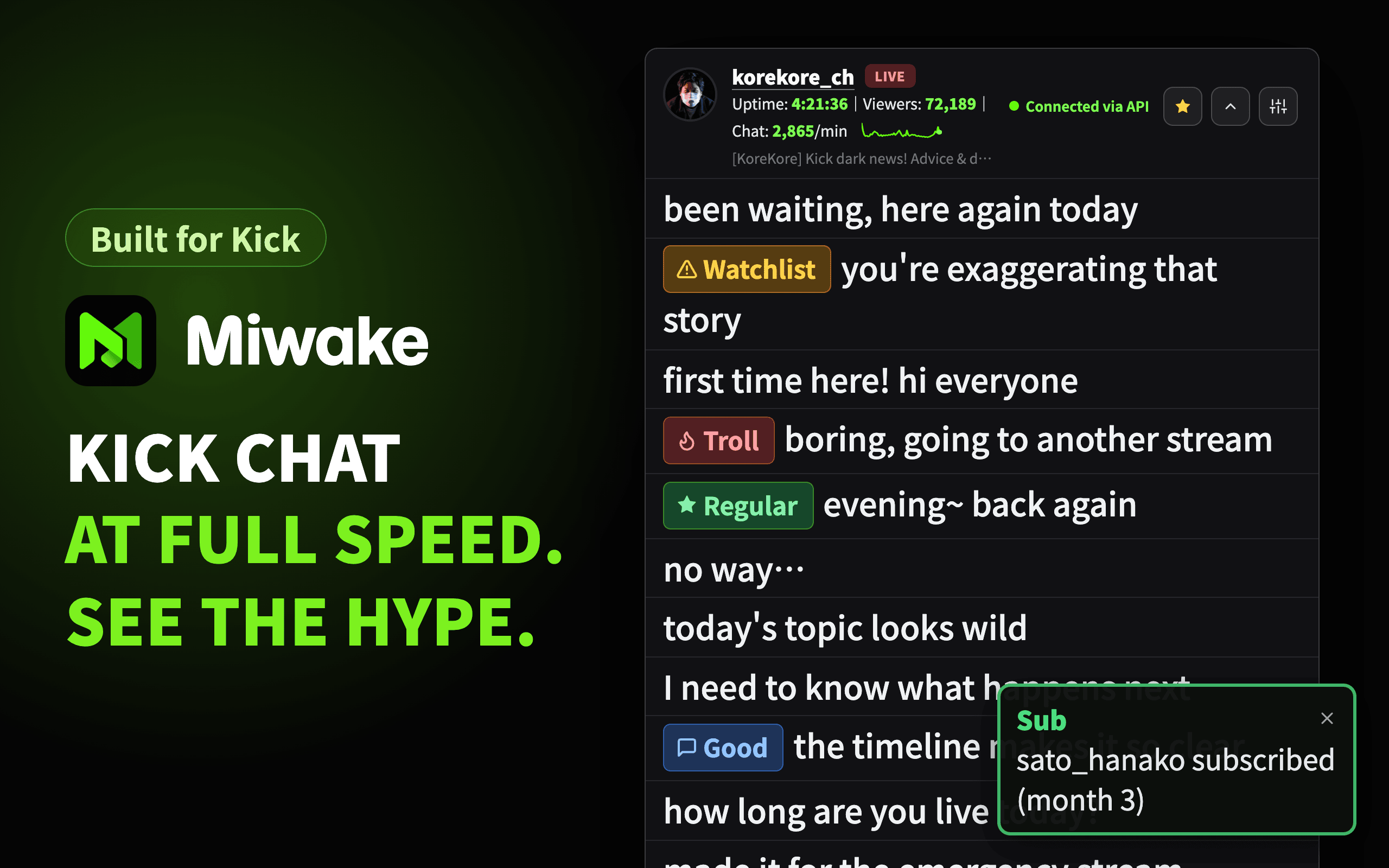
The chat panel shown on a stream is part of the show. Messages flow smoothly, the text is easy to read, and you can see at a glance how lively the stream is and who is taking part.
Miwake is a dedicated chat viewer for the streaming site Kick (kick.com) that brings all of this to one screen, and it is available now.
- Name: Miwake
- Origin of the name: From the Japanese word miwakeru, "to tell apart." Miwake helps you spot the people you want to remember in a fast-moving chat.
- Concept: A fast, smooth chat viewer that helps you recognize people at a glance
- Who it is for: Kick streamers and moderators (viewers can use it too)
- Supported site: Kick (kick.com) only
- Supported browser:
- Google Chrome (Install from the Chrome Web Store)
Who Miwake Is For
- Kick streamers who show the chat panel on their stream, like the Japanese streamer Korekore
- Anyone who wants to keep an eye on viewer count and chat momentum while streaming
- Streamers and moderators who do not want to overlook regulars or users they need to keep an eye on
- Moderation teams that want to share which moderator took action on each user and what they did
- Viewers who want to follow a Kick stream's chat in a dedicated, easy-to-read window
Main Features
- A dedicated viewer where chat flows quickly and smoothly:
Kick's official chat panel refreshes in batches at fixed intervals. Miwake displays chat quickly and smoothly. Deletions, bans, and pinned messages are reflected, and subscription and gift notifications are shown too. You can open a channel by name or URL, or from the live list, favorites, or watch history, and the toolbar icon quickly reopens recently opened streams. Pop it out into its own small window and place it next to the stream or on a second monitor. - Mini graphs that show how the stream is doing:
Stream uptime, viewer count, and messages per minute are shown as numbers and mini graphs in the header. The expanded view adds averages and peaks, and after the stream you can save the graph as an image. - Display settings that fit your stream layout:
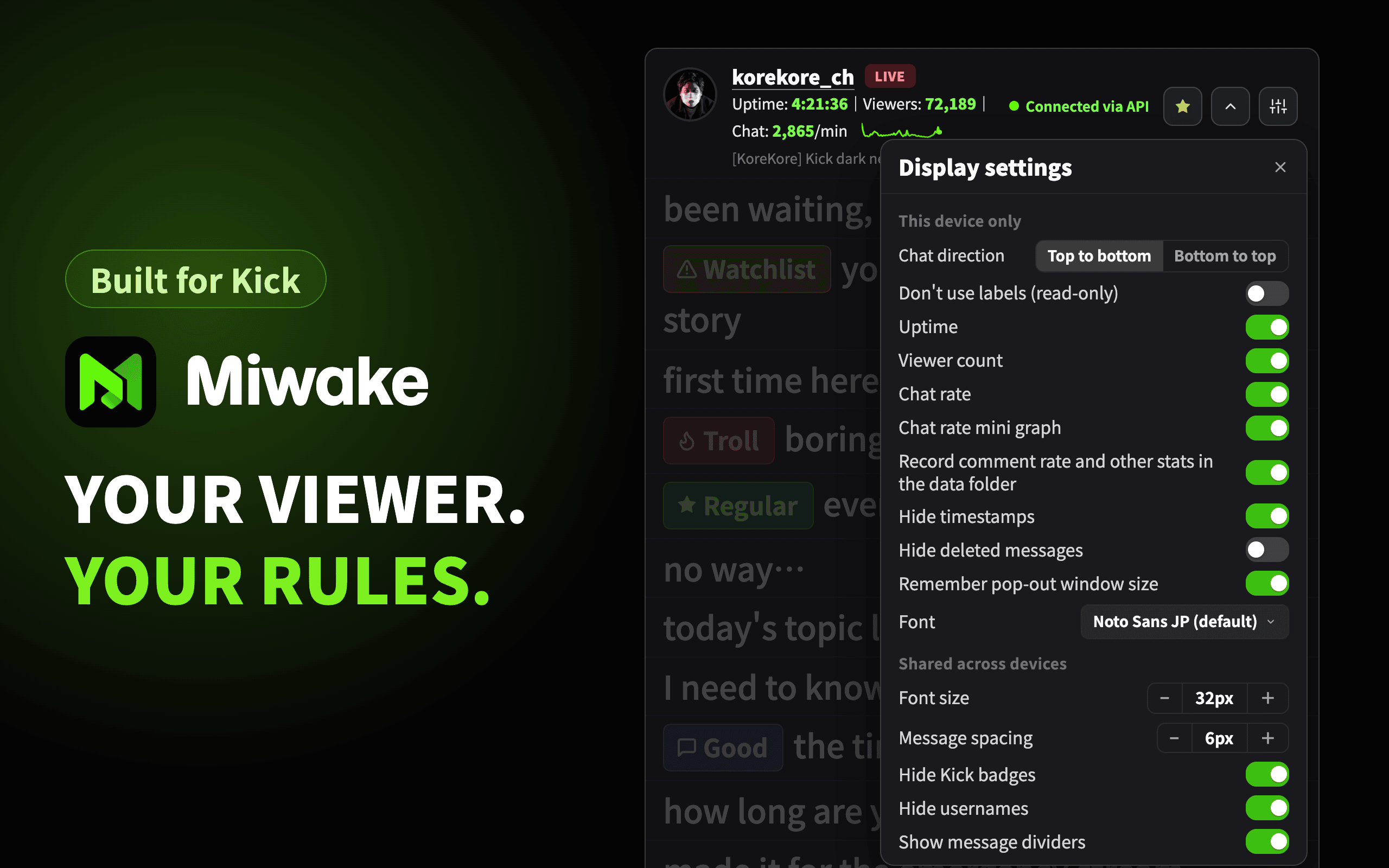
Fine-tune font size, message spacing, dividers, font, and the direction the chat flows. Timestamps and usernames can be toggled, so you can keep the on-stream view lean and make the text large on a second monitor. - Labels that help you recognize people at a glance:
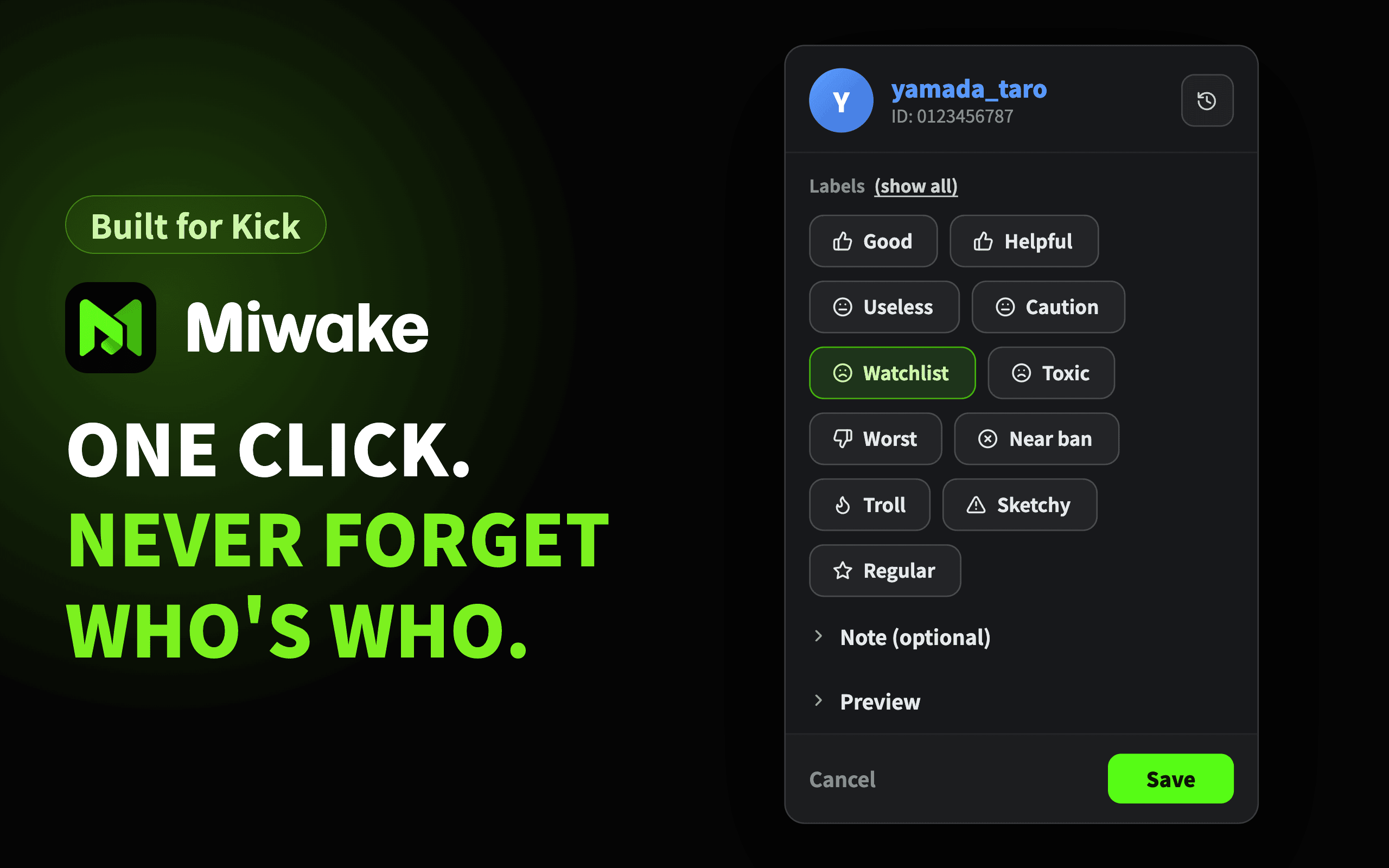
Click a message to attach a label such as "Regular" or "Watchlist," together with a note. From the next message on, an icon appears in front of the name automatically. It is applied retroactively to messages already on screen, so you spend less time wondering "who was this again?" Label names, colors, and icons are fully customizable, and PNG images are supported. - Manage your labels in one place:
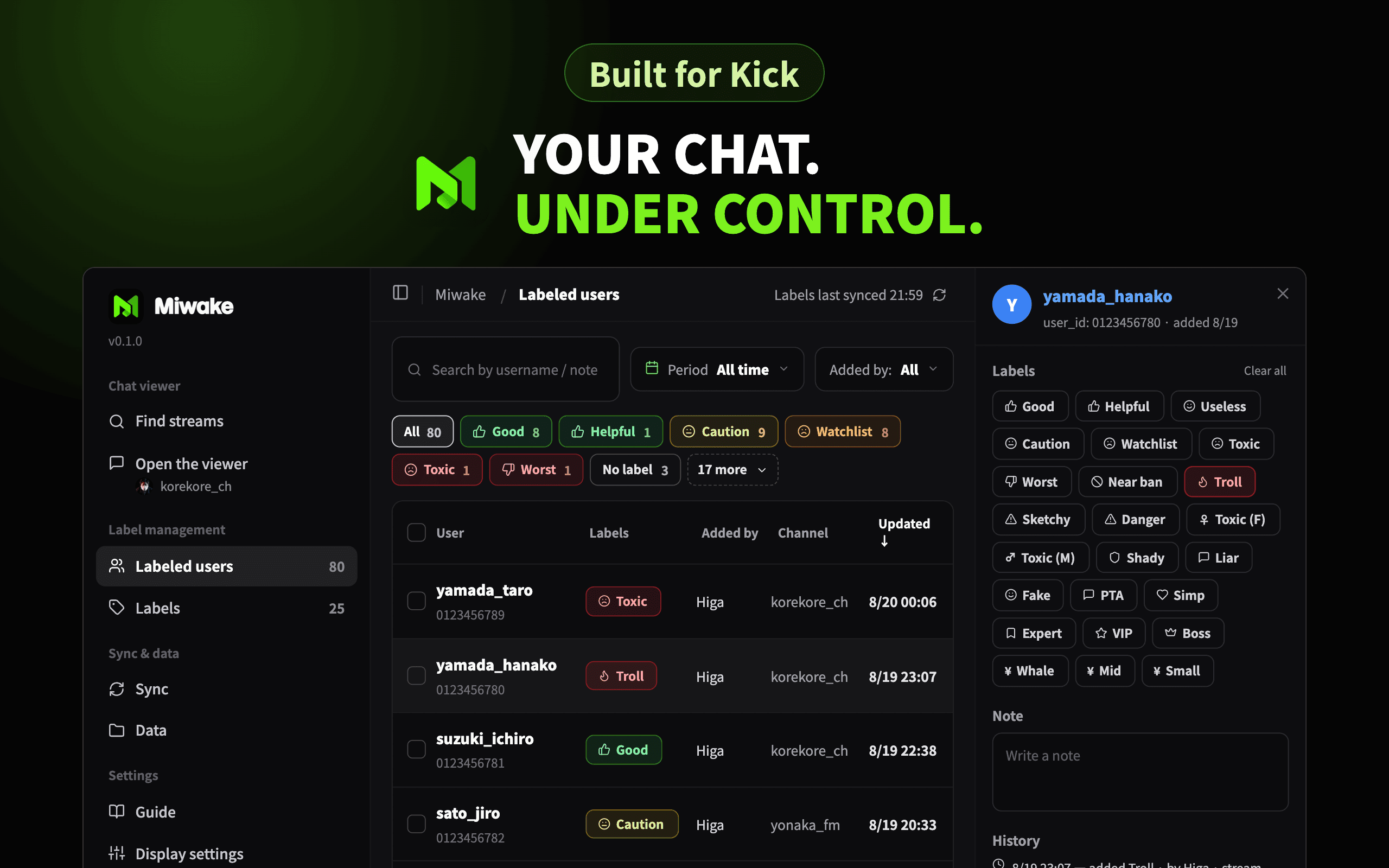
The dashboard lets you search, filter, and bulk-edit labeled users. Adding and reordering labels, and exporting and importing records, are done here as well. - Records that work solo or as a team:
Records are saved to a data folder you choose on your own computer. For teams, hand the file over or sync automatically through a shared folder. Importing the same records more than once never creates duplicates, and the order does not matter. - No account required, data stays local:
The chat viewer works as soon as you install and open it. If you do not use labels, you do not even need to pick a folder. Labels and other records are saved only to the folder you chose. Miwake never sends your records or settings to the developer's servers.
Screenshots
▼ The label popover that opens when you click a message.
Pick a label and write a note on the spot.
▼ The list of labeled users in the dashboard.
Filter by label or period, and check the details in the right panel.
▼ The chat viewer's display settings.
Adjust the flow direction, font size, font, username visibility, and more.
Requirements
- Google Chrome 120 or later
Older versions cannot install the extension. - A data folder (only if you use labels)
Choose one folder on your computer as the data folder for labels and notes. You do not need this just to watch chat.
Please Note
Miwake is an unofficial tool with no affiliation with kick.com. Changes on kick.com may temporarily stop it from working.
Miwake is read-only. Sending messages, subscribing, and purchasing items must be done on the official kick.com pages (there are no plans to support these).
Installation
Miwake is available on the Chrome Web Store.
How-to Videos
Short videos (in Japanese) walk you through everything from installation to the basic operations.
- Installation and initial setup
- Opening the comment viewer and adding your first label
- Adding and editing labels
- How to open the comment viewer
Contact
For questions and requests about this extension, please reach us at:
- Email: info@cofus.work
- X (formerly Twitter): @_cofus
- Store support page: Chrome Web Store support page
More
ChangeLog
v0.6.1 (2026/10/14)
- 🐛 Fixes
- Fixed the chat viewer staying on "Connection stopped" and never connecting: From October 14, 2026, a change to the connection endpoint on Kick's side stopped the chat viewer from connecting on every channel. Miwake now uses the current endpoint.
- Fixed messages filled in after a disconnection sometimes not being placed in time order.
- Fixed a deleted or banned pinned message sometimes being shown again.
- Fixed the favorite star not following changes made in another window.
- Fixed messages that arrived while the chat was not paused being counted as new the next time you paused.
- Fixed "Open in dedicated chat viewer" in the right-click menu sometimes not opening in front.
- Fixed stats being recorded for the time recording was off after turning it back on.
- Fixed periods when receiving had stopped, or the device was asleep, being recorded as zero messages.
- Fixed some stats sometimes being lost when closing the window.
- Fixed the label popover closing when you pressed inside it and released outside.
- Fixed a note you were writing sometimes reverting to older text after saving only labels.
- Fixed being unable to re-add a removed label for a user who has more labels than the limit.
- Fixed being unable to leave the first-run setup in browsers that cannot pick a folder.
- Fixed the member ID check not being redone after choosing a different save location during first-run setup.
- 💡 Improvements
- Right after opening the dashboard, the save location's connection status is shown first, along with a loading indicator.
- The sync page now shows when a sync run is taking long and later runs are being skipped.
- The reset confirmation now lists everything that cannot be restored once deleted.
v0.6.0 (2026/10/07)
- ✨ New
- Noto Sans JP in the official chat: The official chat can now use the Noto Sans JP font bundled with Miwake, so it matches Miwake's own view even if the font is not installed on your device.
- 🔄 Changes
- Chat direction now defaults to "Bottom to top": New messages appear at the bottom by default, as in Kick's official chat. This applies to new installs and to anyone who has never changed the chat viewer's display settings. If you have already changed them, your current direction is kept. You can switch at any time with "Chat direction" in the display settings.
- 💡 Improvements
- The official chat's typeface, text size, and text weight now match Miwake's own view.
- "Open details" in the pop-out window's display settings panel now opens the dashboard at the matching setting.
- 🐛 Fixes
- Fixed auto-scroll stopping partway through fast-moving chats when the chat direction is "Bottom to top".
- Fixed sometimes being unable to scroll back to earlier messages during auto-scroll, and auto-scroll sometimes stopping again right after resuming.
- Fixed wide emotes appearing too small in the official chat.
- Fixed the user list keeping old contents right after "Reload now".
- Fixed a closed pinned message sometimes reopening right after you open a channel.
v0.5.1 (2026/10/06)
- 💡 Improvements
- The official chat now uses the font and text weight you chose in the display settings, so it looks the same as Miwake's own view. (With the default font, your system font is used if Noto Sans JP is not installed.)
- 🐛 Fixes
- Fixed the official chat pausing whenever the mouse pointer rested on it. It still pauses while you scroll up to read back.
- Fixed messages posted right after you open a channel sometimes missing from the list.
v0.5.0 (2026/10/04)
- ✨ New
- Switch to the official chat: Use "Switch to official chat" in the chat viewer's display settings panel to switch to Kick's official chat. It is read-only, so you cannot post from it (and no sign-in information is sent).
- Automatic switch when chat stops arriving: If messages stop arriving because of a problem on Kick's side, Miwake detects it and switches to the official chat automatically. When messages start arriving again, it fills in the messages you missed and switches back. You can change how long to wait before deciding, and whether to switch and switch back automatically, in the display settings.
- Pop-out window position is remembered: The pop-out window now reopens at the position (not just the size) it had when you last closed it. If that position is off-screen, the window opens without it.
- 💡 Improvements
- "Recently opened" in the toolbar pop-up now shows each channel's icon.
- Pasting a kick.com pop-out chat URL (the one you copy for OBS) on the start page now opens that channel.
- The Miwake menu now also appears when you right-click selected text, links, or images on kick.com.
- Reviewed keyboard use, including text contrast, the Escape key during Japanese input, and focus after saving.
- 🐛 Fixes
- When sharing with a team, fixed labels deleted by another member coming back when you saved, and colors or icons changed by another member reverting when you saved.
- Fixed being able to create labels whose names look identical to others (with invisible characters), or whose names are only invisible characters.
- Fixed saving a note before the existing note had loaded overwriting it.
- Fixed automatic import from the sync folder staying stopped after a temporary read error.
- Fixed the first messages disappearing, or the same messages appearing twice, after reconnecting.
- Fixed first-time setup sometimes taking about 40 seconds to finish.
- Fixed favorites coming back when you clicked "Remove from favorites" twice on the start page.
- Fixed many other display, saving, and sharing issues.
v0.4.0 (2026/09/22)
- ✨ New
- Recently opened streams from the toolbar icon: The toolbar icon's pop-up now lists up to two "Recently opened" streams. Click one to open that channel in the chat viewer, even when the current tab is not a stream page — handy for getting back quickly if you close the viewer window mid-stream.
- Grant folder access again on the spot: If access to your data folder has expired when you go to add a label, you can grant it again right there, without switching to the dashboard.
- Show or hide the channel icon: A new "Channel icon" option in the display settings hides the channel icon in the header.
- 🔄 Changes
- Font and bold settings are shared across devices: The chat viewer's font and bold settings are now shared across all devices signed in to the same Google account, like the other display settings. If you used different settings on different devices, the values from the device that saved first are used everywhere.
- Stream lists on the start page: The streams listed under "Live now" and "See all" now follow your language setting. In Japanese, Japanese streams are shown; in English, streams in all languages are shown, sorted by viewer count.
- 💡 Improvements
- Pinned messages now follow the chat text size (shown one step smaller than messages).
- Narrow pop-out windows now show stream time, viewers, and comment rate in the header, and the display settings panel fits the window width.
- User notes can now span multiple lines: Enter saves, and Shift+Enter inserts a line break.
- Readability, keyboard use, and screen reader support were improved throughout: higher text contrast, focus moves into the detail panel when it opens, and status changes are announced.
- Rendering and scrolling are lighter on busy streams.
- 🐛 Fixes
- Fixed a ban mark staying on a user's new messages after their timeout (temporary ban) ended.
- Fixed messages sent while the connection was down sometimes going missing after reconnecting, and the connection sometimes being slow to recover (or stalling) after the network came back.
- Fixed lines being trimmed while you were reading them with the flow set to "bottom to top" and scrolling paused.
- Fixed long Japanese label names being cut off by the length limit while still being converted.
- Fixed line breaks disappearing from user notes.
- Fixed the text size slider sometimes lowering the setting unexpectedly when touched.
- Fixed failed saves on the dashboard's Display settings page going unreported; a failure is now shown.
- For teams sharing a folder: fixed labels created by other members sometimes not showing up on your screen, snapshots occasionally removing labels other members had added, and "Export everything (all members)" becoming unavailable once a single snapshot existed.
- Many other fixes around display, saving, and sharing.
v0.3.0 (2026/09/04)
- ✨ New
- English interface: When Chrome's display language is not Japanese, Miwake now runs in English.
- Language setting: Choose Auto / 日本語 / English under "Language" in Display settings, independently of Chrome's language.
- Bold message text: A new setting renders the chat viewer's message text in bold (on by default). Toggle it from the viewer's display settings or the Display settings page. Fonts without a bold face use their heaviest available weight.
- Guide in English: When the interface is in English, the Guide page's text, contents, and screenshots are in English.
- The Official site, Changelog, and Privacy policy links open the English release article when the interface is in English.
- 💡 Improvements
- Renamed the recording switch in the viewer settings to "Record comment rate and other stats in the data folder" (no change in behavior).
v0.2.1 (2026/09/01)
- 🐛 Bug fixes
- "Save image" for the chat-rate graph now uses the same aggregation (interval averages) and scale as the expanded graph. This fixes two issues: the exported image could show a noticeably different curve, and the line could break at every missing minute. The reference lines (peak, average, and low) now use the same scale as the graph, and the per-minute maximum appears in the heading as the "Busiest minute".
- Fixed an issue where, if the connection silently dropped, an incomplete observation from just before the drop could be recorded as stream data (messages per minute). The last few minutes are now held back to allow for delayed disconnect detection, and only confirmed minutes are saved.
v0.2.0 (2026/08/29)
Miwake is now a dedicated chat viewer for Kick. v0.1.0 was an extension that added labels to Kick's official chat panel. Working inside the official panel, however, made it impossible to pause the chat while attaching a label. So Miwake now ships its own chat viewer, and labeling is one of the features built on top of it. This article has been rewritten to reflect that.
- ✨ New
- Dedicated chat viewer: A chat viewer built into the extension. Messages render quickly and smoothly, and deletions, bans, and pinned messages are reflected. Open a channel by name or URL, or from the live list, favorites, or watch history. A pop-out window is supported.
- Stream status: Uptime, viewer count, and chat rate as numbers and mini graphs in the header. The expanded view adds average and peak lines and image export.
- Notifications: Subscriptions, gifted subscriptions, Kicks gifts, hosts (incoming raids), and reward redemptions appear as highlighted blocks in the flow and as floating toasts. Each type can be toggled on or off.
- Toolbar popup: Three entry points: "Dashboard", "Find streams", and "Open in the chat viewer".
- Stream data recording: Messages per minute and viewer count are recorded to your data folder while you watch (and shared with members of the same folder when used as a team).
- Guide page: Redesigned as a guide organized around the chat viewer.
- 💡 Improvements
- Labels are now displayed and attached entirely inside the extension's viewer. Miwake no longer modifies kick.com pages.
- Lighter first-run setup. If you do not use labels, you do not need to pick a folder.
- The dashboard is now centered on the chat viewer, and every page has its own URL, so you can share or bookmark individual pages and use the browser's Back and Forward buttons.
- The label popover was tidied up, including history wording, clear-all, and the discard confirmation.
- Display settings gained font selection and chat flow direction.
- A
labels.jsonthat has become 0 bytes can be recovered from the dashboard.
- 🐛 Bug fixes
- Closed a path where catch-up after reconnecting could mark live messages as deleted.
- Reduced lost writes when appending to the data folder collided with another process.
- Fixed edits being lost and actions being dropped in label editing and lists.
- Many other fixes.
- 🔧 Maintenance
- Hardened data storage and greatly expanded the test suite.
v0.1.0 (2026/08/16)
- Initial release
Privacy Policy
Last updated: August 18, 2026
Miwake ("the extension") is a browser extension that displays the live chat of the streaming site Kick (kick.com) in a dedicated window inside the extension, and lets you attach labels and notes to chat participants to assist with viewing and moderation. The developer does not operate any server for storing or syncing data. The developer never receives user data through the extension and cannot access data stored on the user's device.
Information Handled
In response to the user's actions (with the exception described under "When Data Is Recorded" below), the extension records the following information on the user's device:
- kick.com user IDs and display names
- Labels attached and notes written by the user
- The text of the message that was clicked when a label was attached (up to 200 characters)
- The identifier of the channel where the action took place
- The date and time of the action, and the member name set by the user
- The time of the message in which a display name was confirmed (used to avoid overwriting with an older display name)
- Channels opened in the dedicated chat viewer and when (favorites and watch history; history keeps the latest 10)
- Messages per minute and viewer count observed while watching in the dedicated chat viewer (together with the channel identifier, stream title, and category)
All of this is used to record labels, notes, and action history and show them in chat, and to render the dedicated chat viewer. The extension does not collect login credentials, form input, or browsing history (the record of web pages the user visits).
When Data Is Recorded
Labels, notes, message text, and action timestamps are recorded only when the user clicks a chat message and attaches or edits a label or note.
However, for users who already have a label, the latest display name and message time are recorded in the browser's extension storage whenever that user posts. This keeps the display name correct after a rename and prevents an older name from overwriting a newer one. No information is recorded about unlabeled users just by viewing chat.
Where Data Is Stored
The information above is stored in two places, both on the user's device:
- The data folder the user selected during first-run setup
- The browser's extension storage (a cache to speed up display, and settings)
External Transmission
The extension never automatically sends records or settings to the developer's or any third party's servers.
- The developer does not operate any server for storing or syncing data
- The extension contains no analytics tools, ad networks, or crash reporting
- The developer does not sell, provide, or share data with third parties
- The developer does not use data for advertising, creditworthiness assessment, or lending
Connections Needed to Display Chat
To receive and display chat, the following connections are made. None of them transmit the records listed above; they exist only to read chat.
kick.com/web.kick.com(kick.com API)
Purpose: Fetching channel information, chat history, the live list, and thumbnails. If you allow it in the chat viewer, also fetching where chat connects (which host of the platform below to use) and chat history
Data sent: The identifier of the channel being viewed, plus information the browser attaches automatically (IP address, browser type, and so on)files.kick.com(kick.com image delivery)
Purpose: Loading emotes, badges, and profile images
Data sent: Image identifiers, plus information the browser attaches automaticallyws-us2.pusher.com
Purpose: Receiving chat in real time. This is the real-time delivery platform (Pusher) used by kick.com, and it is a separate domain from kick.com. kick.com specifies the host, so if it changes, this becomes another host on the same platform.
Data sent: The identifier of the chat room being subscribed to, plus information the browser attaches automaticallykick.com/popout/…/chat(showing Kick's official pop-out chat)
Purpose: Showing Kick's official chat inside the viewer when comments stop arriving (automatic switching is on by default) or when you switch to it yourself. The resources it loads are decided by the kick.com page (including any third-party resources the page uses). If you have chosen a non-default font, that font (Google Fonts) is also loaded from inside this view
Data sent: Information the browser attaches automatically. Your kick.com login (cookies) is not sent
Kick's chat is delivered through Pusher, so the same connection is made when you open a kick.com page. The extension makes that connection from its own window instead. None of these connections include the user's login credentials or authentication cookies.
In addition, when you open the dashboard (the entry point to the chat viewer), requests go to kick.com even before you pick a channel, to show the live list and the live status of favorites and watch history. Only the channel identifiers needed for display and the information the browser attaches automatically are sent; the records above are not included.
The images shown in chat (profile images, badges, emotes, thumbnails) are fetched from the URLs returned by the kick.com API. If kick.com changes where it serves them, hosts other than those listed above may be used.
About Fonts
The typeface used in the extension is bundled with the package, and no external connection is made with the default settings.
Only if you change the dedicated chat viewer's font to something other than the default (from the viewer's display settings or the dashboard's display settings page), a connection is made to fonts.googleapis.com / fonts.gstatic.com (Google's servers) to load that font. This sends the font selection and information the browser attaches automatically (such as the IP address) to Google. The records above are never sent. While the viewer is switched to the official chat (Kick's own chat view), this connection is made from inside that view (the kick.com page); the destination and the information sent are the same. If you want to avoid external connections, keep the default font.
Sharing Within a Team
When several moderators share records, the user exports a sync file and hands it to the other party. The extension never sends files automatically to other people or to cloud storage.
A sync file contains the information listed under "Information Handled." The message text and user identifiers captured when a label was attached are included and passed to the recipient. Please decide for yourself whom to share with and what to share.
If you share a data folder, the per-minute message counts and viewer counts recorded by the dedicated chat viewer (including the channel watched and when) are also shared with members using the same folder. This is how everyone's observations are combined to draw a trend with fewer gaps.
If you sync the data folder or inbox folder through a cloud storage service, the files are transmitted and stored through the service you chose, and that service's terms and privacy policy apply.
Deleting Data
- Settings and cache inside the extension can be reset from the dashboard's "Data" page
- The records themselves live in the folder you selected. Removing the extension does not delete that folder. To delete everything, delete the folder yourself
Permissions
The extension requests the following permissions, for these purposes:
- Access to kick.com:
To fetch channel information, chat history, and the live list from the kick.com API and show them in the dedicated chat viewer. Also used to determine whether to show "Open in the chat viewer" in the context menu and toolbar popup (that is, whether the current page is a stream page). Only when the official pop-out chat (kick.com/popout/…/chat) is shown inside the viewer (for example, when receiving comments has stopped), only its appearance is adjusted (styles such as font size are applied, and buttons and links inside chat messages are taken out of keyboard navigation). Your kick.com login (cookies) is not sent, and the page content, such as chat messages, is never read or sent anywhere. Nothing is injected into any other kick.com page (such as stream pages). - Storage / Unlimited storage:
To store settings, lookup caches, and label images. - Alarms:
To check the shared inbox folder periodically and import records that have arrived. - Downloads:
To export sync files for sharing. - Context menus:
To open the dedicated chat viewer and the dashboard from kick.com pages.
No access to sites other than kick.com is requested (the connections listed under "Connections Needed to Display Chat" are ordinary requests that do not require a permission).
Changes to This Policy
If the way the extension handles data changes, this policy will be updated and the change will be announced within the extension.
Disclaimer
Miwake is an unofficial tool with no affiliation with kick.com. Changes on kick.com may temporarily stop it from working.
Contact and Revisions
For questions about this policy, contact info@cofus.work. This policy may be revised in response to changes in law or in the extension. Revisions take effect when posted on this page.