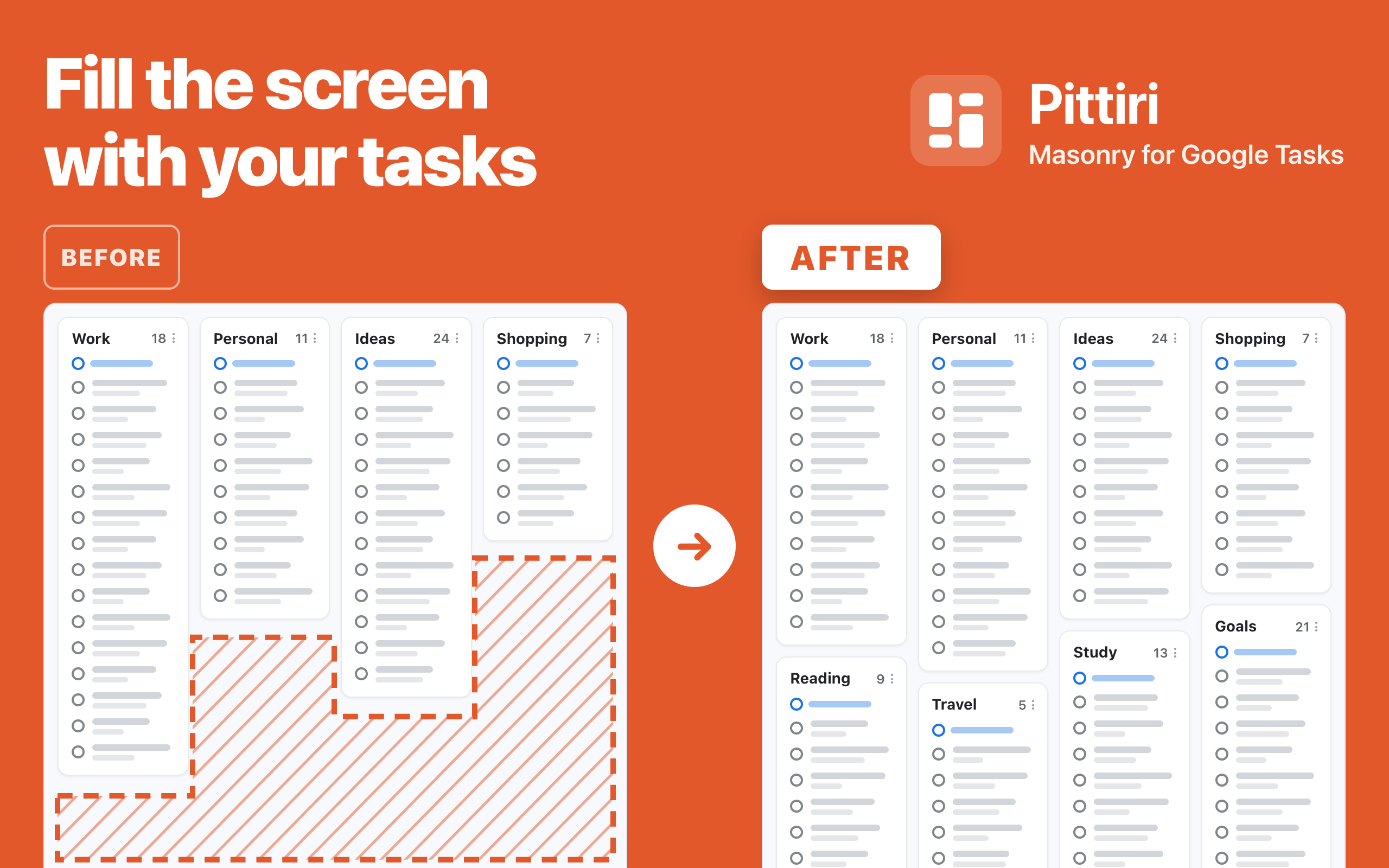
Once you have several lists in Google Tasks, they line up in a single row that runs off the right edge of the screen, with big empty gaps under the short ones. Finding the list you need means scrolling sideways, again and again.
Pittiri, a browser extension that packs your Google Tasks lists together so you can see them all at a glance, is now available.
- Name: Pittiri
- Origin of the name: From the Japanese word pitchiri, meaning "packed snugly with no gaps"
- Concept: Every Google Tasks list, gap-free, at a glance
- Supported browser:
- Google Chrome (Install from the Chrome Web Store)
Who Pittiri Is For
- People who juggle several lists in Google Tasks
- Anyone who wants to see every list without scrolling sideways
- People whose lists vary in length, such as work, shopping and ideas
- Anyone who shows Google Tasks on a stream or while sharing their screen
Main Features
- Masonry layout:
Arranges the lists that used to sit in one row into the number of columns you choose, with no gaps. - Columns, gap and packing:
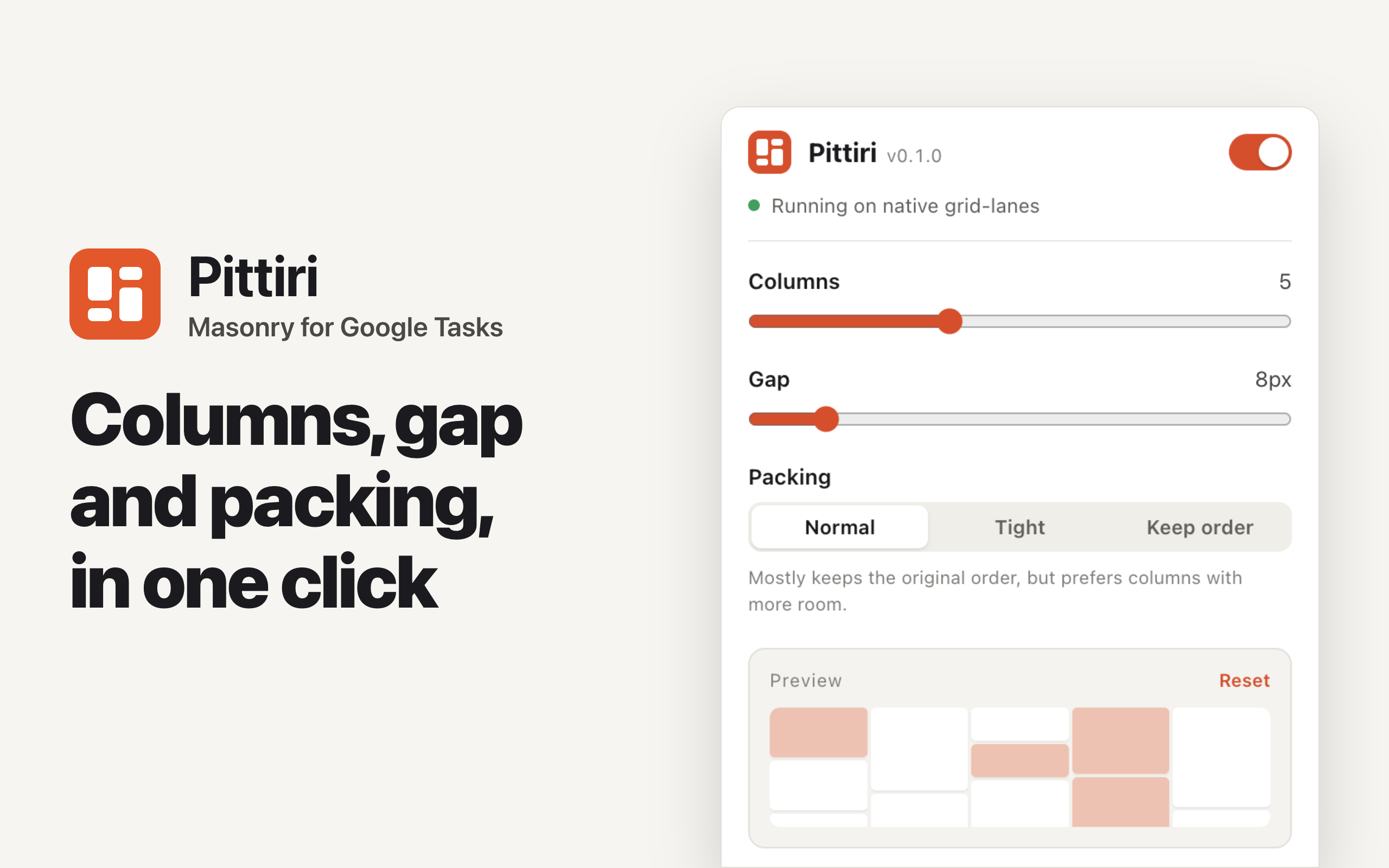
Change the columns (1–12), gap (0–64px) and packing (Normal / Tight / Keep order) in the popup. Changes apply instantly, and a preview shows the arrangement. - Task count badges:
Shows the number of open tasks next to each list header. - Hide the page header:
Hides the header at the top of Google Tasks so your lists use the full height of the screen. - Remember the main menu:
Keeps the menu on the left closed after you reopen the page, if you had closed it. - Blur task content:
Blurs task titles, notes and dates. Hovering a list reveals only that list, so you can stream or share your screen with confidence. - Works in Google Calendar too:
Packs your lists the same way in the full-screen Tasks view of Google Calendar. - Column drag lock:
While Pittiri is on, you cannot grab a list column and move it by accident. - Synced settings:
Chrome sync shares your settings across devices signed in to the same account. - Layout change notice:
If a Google Tasks update stops Pittiri from working, a notice appears in the bottom-right corner. - Languages:
Available in English and Japanese, following your browser language.
How to Use
Install it and open Google Tasks. Pittiri is on from the start, so your lists are packed across the screen right away.
You can adjust the arrangement in the popup, opened from the Pittiri toolbar icon. To return to the original view, turn off the switch at the top right of the popup.
Screenshots
Requirements
- Chrome 120 or later (Chromium-based browsers)
- Google Tasks (tasks.google.com), in the "All tasks" view where multiple lists are shown
- The full-screen Tasks view of Google Calendar. "Hide the page header" and "Remember the main menu" are not available there. The Tasks side panel is not supported
- Uses the browser's built-in support for the new layout feature (CSS Grid Lanes) where available, and a bundled compatible implementation elsewhere
Contact
If you have any questions or requests about this extension, feel free to reach out.
- Email: info@cofus.work
- X (formerly Twitter): @_cofus
- Store support page: Chrome Web Store support page
More
- All browser extensions I have released
- Google Tasks is a trademark of Google LLC. This extension is not affiliated with or endorsed by Google.
ChangeLog
v0.3.0 (2026/10/13)
- Pittiri now works in the full-screen Tasks view of Google Calendar. Calendar tabs that were already open before the update start working after a reload
- In the Tasks view of Google Calendar, the popup now disables "Hide the page header" and "Remember the main menu", which cannot work there, and explains why
- Reordered the options in the popup
v0.2.1 (2026/09/18)
- After an update, the popup now tells you when open Google Tasks tabs need a reload and lets you reload them with one click (the icon shows "NEW" after an update)
- Fixed the main menu sometimes not being remembered as closed
v0.2.0 (2026/09/18)
- Added an option to hide the header at the top of the page so your lists use the full height of the screen
- Added an option to remember whether the main menu on the left was open or closed, and restore it when you reopen the page
- While Pittiri is on, you can no longer grab a list column and reorder it by accident
- Count badges no longer blink every time you touch a task; only the number changes
- Fixed many issues, including horizontal scrolling and the blur coming off after the extension updates
- Improved the accessibility of the popup and the count badges
v0.1.0 (2026/09/16)
- Initial release
Privacy Policy
Last updated: September 18, 2026
Pittiri (the "Extension") does not collect or send your personal information or the content of your tasks. The developer does not operate any server and does not receive your data.
- What is stored: Your settings, such as columns and gap, and records the Extension needs to work, such as the result of detecting a change in the Google Tasks page layout and whether the main menu was left closed, are saved in the browser's extension storage. Chrome sync shares your settings across devices signed in to the same account
- What is not collected: The content of your tasks, your Google account information, browsing history and similar data are not collected. Count badges and blur work only on what is shown on screen
- No transmission: Nothing is sent to the developer or any third party. No analytics or advertising is included
- Deletion: Uninstalling the Extension deletes the stored information
For questions, please contact info@cofus.work. We may revise this Policy when needed, and revisions become effective when posted on this page.
Terms of Service
Last updated: October 12, 2026
By installing and using the Extension, you agree to these Terms.
- The Extension is free and provided as is. We make no guarantees about its content or behavior, and we are not liable for any damage caused by using, or being unable to use, it
- Updates by Google may stop features from working without notice
- Google Tasks is a trademark of Google LLC. The Extension is not affiliated with or endorsed by Google
- We may change or discontinue the Extension and these Terms without notice. Revised Terms become effective when posted on this page
- These Terms are governed by the laws of Japan, with the Osaka District Court as the exclusive court of first instance for any dispute